Select Vouchers at Kredivo |
|---|
|
Promo Khusus pengguna Kredivo di Tokopedia
Promo Khusus untuk kategori Travel
Promo Khusus untuk Produk Digital
|
|---|
 You can only use 1 type of voucher/promo in a single transaction.
|
|---|
Let's get the items out of your cart! |
|---|

|
Transactions up to Rp50 Million |
|---|---|
| Get limit to shop now and pay later by pay in 30 days, and installment of up to Rp50 Million! | |

|
Quick and easy payments |
| You can connect a Kredivo account for instant checkout at Tokopedia. | |

|
A lot of promos on Tokopedia |
| Save money by taking advantage of various promos for Kredivo users. | |
How to use promo code in Tokopedia |
|---|
|
Save more by simply inputting a promo code when transacting in Tokopedia with Kredivo. |
|
1. Click promo section in Tokopedia checkout page. 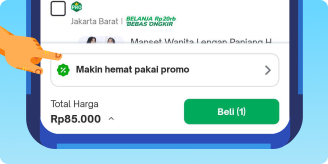
|
|
2. Click Insert Code to input promo code discount then click apply. 
|
|
3. Checkout transaksi di Tokopedia. Pilih Kredivo sebagai metode pembayaran. 
|
|
4. You'll be redirected to Kredivo's payment page, select your payment term. 
|
|
5. Enter your phone number & PIN to login. 
|
|
6. Enter OTP, and voilà—it's done! Your items are on the way. 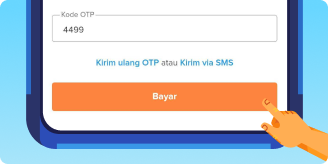
|